
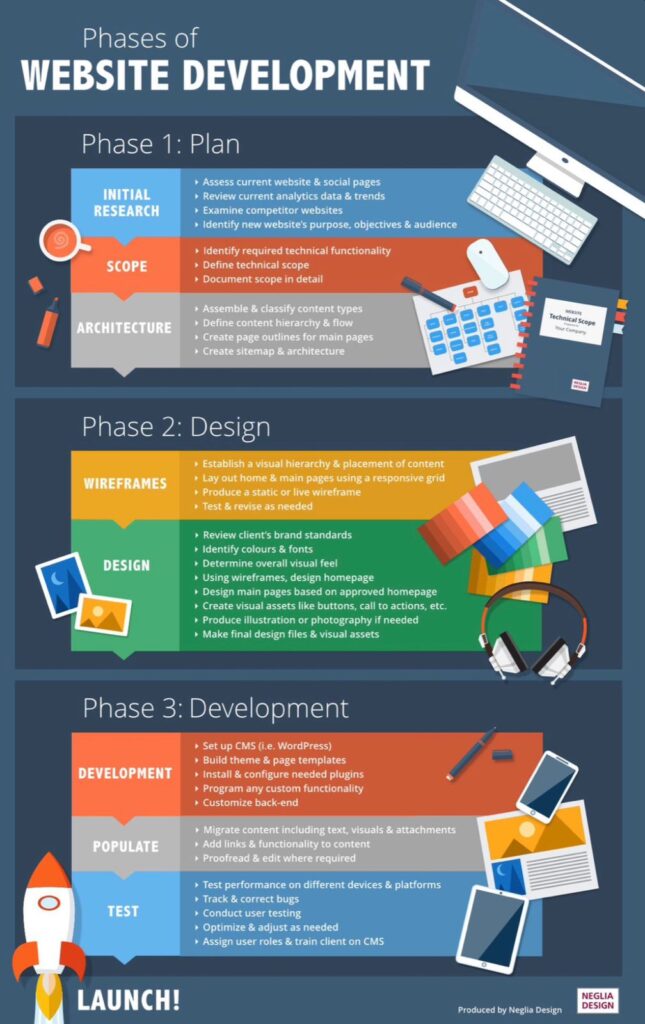
Website development is the process of
creating websites and applications. It involves a combination of coding,
designing and maintaining websites to ensure they function properly and look
great. In today’s digital age, having a strong online presence is essential for
businesses and individuals alike, making web development a highly sought-after
skill.
To start, let’s talk about the core technologies of web development: HTML,
CSS, and JAVASCRIPT.
HTML: The backbone of webpages
HTML(Hypertext makeup language) is the foundation of every web page. It
uses tags to define elements like headings, paragraphs, images, and links. To
start building a web page with HTML, you need to create a basic structure. The
structure begins with the HTML doctype declaration, which tells the browser
that the document is written in HTML. It looks like this:
<!DOCTYPEhtml>
After the doctype, you’ll create the HTML
element, of the page. Inside the HTML element, you’ll find two main sections:
the head and the body. The head section contains meta-information about the
page, such as the title, character encoding, and linking to external sheets or
scripts. The title element placed within the head tags defines the title of
the webpage that appears in the browser’s title bar.
The body section is where you put the visible
content of your web pages. This is where you’ll use various HTML tags to
structure and present your content. For example, the h1 to h6 tags are used to
define headings of different levels, with h1 being the highest level and h6
being the lowest.
Paragraphs are defined using the p tag, and line
breaks are created with the BR tag. To display images, you can use the img tag,
specifying the source (src) attribute to indicate the image file location.
Links are created using the anchor tag (a), with
the href attribute specifying the URL that the link points to. This allows
users to navigate to other pages or sections within the same page.
HTML also provides a range of tags for creating
lists, tables, forms, and more. Lists can be ordered (ol) or unordered (ul),
and list items are defined using the li tag. Tables are created using the
table, tr, and td tags, allowing you to organize data in rows and columns.
Forms are essential for gathering user input, and
HTML provides a variety of form-related tags such as input, select, and
textarea. These tags allow users to enter text, select options from a dropdown,
or provide longer text input.
Remember, HTML provides the structure.
CSS, which stands for Cascading Style Sheets, is
a powerful language used to style and format the appearance of web pages. It
works hand in hand with HTML to give websites their visual appeal and layout.
With CSS, you can control various aspects of a
webpage, such as colours, fonts, spacing, and positioning. It allows you to
create stunning designs and customize the look and feel of your website.
One of the key concepts in CSS is the use of
selectors. Selectors target specific HTML elements and apply styles to them.
For example, you can use the “class” selector to target elements with
a specific class name and apply styles only to those elements.
CSS also provides a wide range of properties that
you can use to modify the appearance of elements. You can change the background
colour, font size, padding, margins, and much more. These properties give you
the flexibility to create unique and visually appealing designs.
Another important concept in CSS is the use of
cascading and specificity. CSS rules can be applied from different sources,
such as external stylesheets, internal stylesheets, or inline styles. When
multiple rules target the same element, the cascade determines which styles
take precedence. Specificity helps determine which styles are applied when
there are conflicting rules.
CSS also supports media queries, which allow you
to apply different styles based on the device or screen size. This is essential
for creating responsive web designs that adapt to different devices, such as
smartphones, tablets, and desktops.
To use CSS, you can include styles directly in
your HTML file using the <style>
tag or you can link an external CSS file using the <link> tag. The latter is the
preferred method as it allows for better organization and reusability of styles.
Overall, CSS is a powerful tool that gives you
the ability to transform a plain HTML structure into a visually stunning and
engaging website. It offers endless possibilities for creativity and allows you
to bring your design ideas to life.
JavaScript is a programming language that adds
interactivity and dynamic features to websites. It’s often referred to as the
“language of the web” because it’s widely used for web development.
With JavaScript, you can create interactive
elements, handle user input, manipulate the content of a webpage, and much
more. It allows you to bring your website to life and create engaging user
experiences.
One of the key features of JavaScript is its
ability to manipulate the Document Object Model (DOM). The DOM represents the
structure of a webpage, and with JavaScript, you can access and modify its
elements. You can dynamically change the content, style, and behaviour of
elements based on user actions or other events.
JavaScript also provides a wide range of built-in
functions and objects that you can use to perform various tasks. For example,
you can use the querySelector
function to select elements from the DOM, the addEventListener function to listen for events and the fetch function to make HTTP requests.
Another powerful feature of JavaScript is its
support for asynchronous programming. This allows you to perform tasks in the
background without blocking the main execution thread. You can use promises,
async/await, or callbacks to handle asynchronous operations such as fetching
data from an API or loading images.
JavaScript is not limited to just web
development. It has also gained popularity in other areas, such as server-side
development with Node.js, mobile app development with frameworks like React
Native, and even desktop application development with Electron.
To use JavaScript, you can include it directly in
your HTML file using the <script>
tag or you can link an external JavaScript file. JavaScript can also be
embedded within other programming languages, such as PHP or Ruby, to add
dynamic functionality to server-side applications.
Learning JavaScript opens up a world of
possibilities in web development. It’s a versatile and powerful language that
continues to evolve with new features and updates. Whether you’re a beginner or
an experienced developer, JavaScript offers endless opportunities for
creativity and problem-solving.
Framework And Libraries: Frameworks and libraries are tools that
developers use to streamline the process of building applications. They provide
pre-written code and components that can be reused, saving time and effort.
A framework is a comprehensive set of tools,
libraries, and conventions that provide a structure for building applications.
It defines the architecture, workflow, and patterns to follow, making it easier
to develop complex applications. Frameworks often come with built-in features
like routing, data management, and user interface components.
One popular framework is React, which is used for
building user interfaces. React allows developers to create reusable UI
components and efficiently update the user interface based on changes in data.
It follows a component-based architecture, making it easier to build and
maintain large-scale applications.
Another widely used framework is Angular. It’s a
full-featured framework that provides a comprehensive solution for building web
applications. Angular offers features like two-way data binding, dependency
injection, and a powerful templating system.
On the other hand, libraries are collections of
pre-written code that provide specific functionality. They focus on solving
specific problems rather than providing a complete application structure.
Developers can pick and choose the libraries they need for their projects.
One popular JavaScript library is jQuery. It
simplifies DOM manipulation, event handling, and AJAX requests. jQuery provides
a concise and easy-to-use syntax, making it a go-to choice for many developers.
Another powerful library is D3.js, which is used
for data visualization. D3.js provides a set of tools for creating interactive
and dynamic charts, graphs, and maps. It gives developers full control over the
visual representation of data.
Frameworks and libraries are not limited to
JavaScript. There are frameworks and libraries available for various
programming languages and platforms. For example, in Python, Django is a
popular web framework, while NumPy and Pandas are widely used libraries for
data analysis and manipulation.
Choosing the right framework or library depends
on the specific requirements of your project. Factors like scalability,
community support, and ease of use should be considered. It’s also important to
stay updated with the latest releases and trends in the development community.
Frameworks and libraries are valuable resources
for developers, as they provide a foundation and ready-made solutions for
common challenges. They help streamline the development process and enable
developers to build robust and efficient applications.
Responsive Design: Responsive design is an approach to web design
that aims to create websites that adapt and respond to different screen sizes
and devices. In today’s digital world, where people access websites from
various devices like smartphones, tablets, and desktops, it’s crucial to ensure
that your website looks and functions well across all platforms.
The key idea behind responsive design is to
create a flexible layout that adjusts its size, content, and elements based on
the screen size of the device. This means that whether your website is viewed
on a small mobile screen or a large desktop monitor, it will automatically
resize and rearrange itself to provide an optimal user experience.
One of the main techniques used in responsive
design is CSS media queries. Media queries allow you to apply different styles
and layouts based on the characteristics of the device, such as screen width,
orientation, and resolution. By using media queries, you can create breakpoints
in your design where the layout changes to accommodate different screen sizes.
Another important aspect of responsive design is
fluid grids. Instead of using fixed pixel-based measurements for layout elements,
fluid grids use relative units like percentages. This allows the layout to
scale smoothly and proportionally across different devices.
Responsive design also considers the usability
and accessibility of the website. It ensures that the content remains readable
and accessible regardless of the screen size. This includes using appropriate
font sizes, optimizing images, and providing easy navigation and interaction.
Implementing responsive design requires careful
planning and consideration. It’s important to prioritize the content and
features that are most important for mobile users, as they have limited screen
space. Progressive enhancement is often used, where the basic functionality is
available on all devices, and additional features are added for larger screens.
Responsive design has become a standard practice
in web development due to its numerous benefits. It improves the user
experience, reduces the need for separate mobile versions of websites, and
helps with search engine optimization. It also future-proofs your website, as
new devices with different screen sizes and resolutions continue to emerge.
Many popular frameworks and libraries, like
Bootstrap and Foundation, provide built-in responsive design features that make
it easier to create responsive websites. These frameworks offer pre-designed
responsive grids, components, and styles that you can use as a starting point
for your project.
So, whether your website is accessed on a tiny
smartphone or a large desktop screen, responsive design ensures that it looks
great and functions seamlessly. It’s an essential aspect of modern web design
that helps you reach and engage with your audience across all devices.
Web Security: Web security plays a vital role in protecting
websites and their users from various threats and vulnerabilities. With the
increasing reliance on the internet for various activities, it’s crucial to
ensure that your online presence is secure and protected.
One of the primary concerns in web security is
protecting sensitive user data. This includes personal information, such as
names, addresses, and financial details. Websites must implement secure
communication protocols, such as HTTPS, to encrypt data transmission between
the user’s browser and the web server. This helps prevent unauthorized access
and eavesdropping on sensitive information.
Another important aspect of web security is
protecting against cyber attacks, such as hacking and malware. Websites should
regularly update their software, plugins, and themes to patch any known
vulnerabilities. Implementing strong passwords and utilizing two-factor
authentication can also add an extra layer of security.
Cross-Site Scripting (XSS) and Cross-Site Request
Forgery (CSRF) are common web security vulnerability that can be exploited by
attackers. XSS involves injecting malicious scripts into a website, while CSRF
tricks users into performing unintended actions on websites they trust. Web
developers must implement proper input validation and output encoding
techniques to mitigate these risks.
Web security also includes protecting against
Distributed Denial of Service (DDoS) attacks, where a website’s servers are
overwhelmed with traffic, causing it to become unavailable. Implementing DDoS
protection services and load-balancing techniques can help mitigate the impact
of such attacks.
User authentication is another critical aspect of
web security. Websites should ensure that user passwords are stored securely
using strong encryption algorithms. Implementing measures like account lockouts
and password complexity requirements can help prevent unauthorized access to
user accounts.
Regular backups of website data are essential for
web security. In the event of a breach or data loss, backups can help restore
the website to a previous state. It’s important to store backups securely and
regularly test the restoration process to ensure their effectiveness.
Educating website users about web security best
practices is crucial. Promoting the use of strong passwords, avoiding
suspicious links and attachments, and being cautious with sharing personal information
can help prevent security breaches.
Web security is an ongoing process that requires
constant monitoring and updating. Implementing a web application firewall (WAF)
can help detect and block malicious traffic, while security audits and penetration
testing can identify vulnerabilities that need to be addressed.
In conclusion, web security is essential to
protect websites and users from various threats and vulnerabilities. By
implementing secure communication protocols, regularly updating software,
and protecting.